
🎁 Claim Your FREE ₹19,500 Gemini Upgrade (1-Year Access!)
AI Summary
Tap Generate and let AI do the magic
Yes, you read that right! Google is offering a 100% FREE upgrade to the powerful Gemini Advanced Plan worth ₹19,500/year, and this is your golden chance to supercharge your productivity, creativity, and learning — especially if you're a student, developer, or creator.
⚠️ WARNING: Follow the steps carefully and make sure to complete the final step if you truly want to get it 100% FREE.
🚨 Missing the last step could lead to getting charged ₹1,950/month!
✅ Do it right, and you’ll enjoy full access for just ₹2 (fully refundable).
🚀 What’s Inside This ₹19,500/Year Subscription?
Google’s AI Premium Plan gives you access to:
- 🔥 Gemini 2.5 Pro – the flagship AI model (next-gen logic, massive context)
- 🎬 Veo 3 – high-quality video generation model (text to cinematic video!)
- 🧠 AI in Google Workspace apps – Docs, Sheets, Gmail, and more
- ☁️ 2TB Google Cloud Storage – for Gmail, Drive, Photos
Let’s break it down step-by-step:
🧠 Step 1: Use Gemini 2.5 Pro (The AI Beast)
🔍 Huge Context Window (1 Million Tokens)
- Upload large PDFs, codebases, videos, or assignments
- Gemini can read and process everything at once
🖼️ Multimodal Input
- Upload text, images, audio, or video
- Example: Upload a web app UI screenshot, get full responsive HTML/CSS code
🧠 Smart Logic, Debugging & Content Creation
- Debug backend/frontend code
- Solve complex logic/math problems
- Brainstorm, write, translate, and summarize long texts
🎬 Step 2: Use Veo 3 for Text-to-Video Generation
💡 Describe Your Scene in Words, Get a Video
- Example: "A futuristic city with neon lights and flying cars at night"
- Output: Cinematic-quality video with stunning visuals
🎨 Great for Creators
- Create YouTube intros, reels, educational videos, product promos
- Edit your generated videos using Google’s built-in tools
📈 Powered by DeepMind + Google Cloud
- Veo 3 combines real-world knowledge with visual storytelling skills
📜 Step 3: AI in Google Workspace (Smart Assistant Everywhere)
✉️ Gmail
- Write replies, summarize emails, compose in professional tone
- "Request extension for Java project"
📝 Docs
- Generate essays, reports, fix grammar, create outlines
- "Write 600 words on Node.js with intro and conclusion"
📈 Sheets
- Smart formula suggestions, auto-complete tasks, generate templates
- "Make 30-day expense tracker with charts"
📊 Slides
- Auto-create decks from prompts or Docs content
- "Turn this doc into a 5-slide pitch deck with bullet points"
☁️ Step 4: Google One Premium Features
📤 2TB Storage Upgrade
- From 15 GB → 2,000 GB across Gmail, Drive, and Photos
📸 Google Photos Magic
- Access Magic Eraser, HDR, Portrait Light, and more editing tools
🔐 Extra Security + Support
- Built-in Google VPN for safe browsing
- Priority support for any issues
🔍 Gemini Free vs Gemini Advanced
| Feature | Free Gemini | Gemini Advanced (₹19,500 Plan) |
|---|---|---|
| AI Model | Gemini Pro | ⭐ Gemini 2.5 Pro |
| Video Generation | ❌ Not Available | ✅ Veo 3 - Text to Video |
| Workspace Integration | ❌ No | ✅ Docs, Gmail, Sheets |
| Context Window | Limited (~32K) | ⭐ 1 Million Tokens |
| Multimodal Support | Basic | ✅ Text, Image, Audio, Video |
| Google Storage | 15 GB | ✅ 2 TB |
| VPN + Pro Tools | ❌ No | ✅ Yes |
| Cost | Free | ₹1,950/month or ₹19,500/year |
| Current Offer | ❌ None | ⭐ Free for 1 Year (via ₹2 offer) |
🤝 Why Students Shouldn’t Miss This
- ✅ Do More in Less Time: AI for every task – assignments, mails, code, projects
- ✅ Creative Freedom: Generate content, blogs, art, and even videos
- ✅ Zero Risk Trial: ₹2 refundable + cancel anytime
- ✅ Tools You Already Use: Works right inside Gmail, Docs, Drive
⚒️ How to Claim the Offer (Step-by-Step)
🔗 Step 1: Visit goo.gle/freepro
🔍 Step 2: Click "Check Eligibility"

🏫 Step 3: Enter College Details
- Use your college email, verify with Shreerid
 Step 3
✅ Step 4: Confirm Eligibility

💰 Step 5: Click "Get Student Offer"

🔐 Step 6: Pay ₹2 (Refundable)
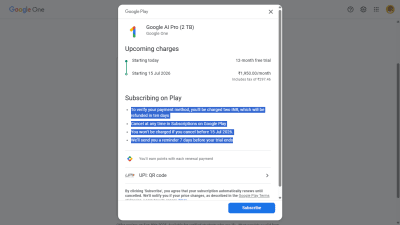
✅ Step 7: Pay via UPI or QR

🎉 That’s It — You’re Now Pro!

⚠️ Auto-Renewal Notice After 12 months, your subscription will auto-renew at ₹1,950/month. Cancel anytime from your UPI app or Google Subscriptions to avoid charges.
Last Step : 🚫 How to Cancel AutoPay
🏦 UPI App (PhonePe, GPay, Paytm, etc.)
- Open your UPI app.
- Go to AutoPay / Mandates.
- Select the subscription.
- Tap Cancel AutoPay or Revoke Mandate ✅
✨ Final Note
This is not just a subscription — it’s a launchpad for your future. Whether you’re a student, aspiring developer, designer, or startup founder — this ₹19,500 toolset is yours for ₹2.
Use it wisely. Build boldly. Learn fearlessly. 🚀